Enter your keyword

Showing posts with label Tools. Show all posts

How to create stunning experiences with interactive content

By On February 12, 2017
*And 5 ways to fully immerse your audience.
Interactive Content
I’m lucky. I’m part of a generation that experienced the transformation of traditional media—putting it right in the palm of my hand. What does this mean for brands? They’re no longer untouchable.
Gone is the one-way street towards customers. Today, that street has a new lane where customers can engage with brands for one very important reason: they want experiences.
That’s right; a big-budget commercial during the Super Bowl no longer cuts it. Unless you’re Oreo.
Every day, content sails through the vast sea of the Internet where only the most remarkable survives. Expectations are high. To succeed, you have to live up to your customers’ new content needs.
And a big part of that need is interactive content—a unique way to create memorable experiences for specific audiences. Get this: in 2016, interactive content is on pace to increase by 75%.
interactive content
Types of interactive content
All content marketing trends point to one common concept: interaction. It’s at the core of every single trend. Here’s the main interactive tools you need to know about, and when and why to use them.
  1. Podcasts
Take a look at the top 5 best-ranking podcasts. What’s the common thread? Compelling narratives.
Podcasts are no longer a niche labor of love. They’re gateways to bigger audiences. So what happens when podcast producers ask their their audience to become part of the story? Authentic interaction begins.
One way of creating a channel of genuine audience engagement is to source stories from listeners. A great example is the Freakanomics podcast. They do this by asking their listeners one simple question: “Would you mind sharing with us a story about how we might have changed your life?”
After that simple question, a swarm of emails comes in. Some of the stories get played on the podcast, but only the most interesting idea gets discussed during an entire episode.
Podcasts
  1. Video
Let’s face it. Facebook and YouTube dictate a big part of today’s main marketing trends. Every time there’s a slight algorithm change, we’re all sent on a wild goose chase to see what works best.
Just take a look at Facebook Live. A few twitches in the Facebook newsfeed algorithm, and live video streaming has a favored spot in newsfeeds—achieving the highest ranking spots in the Facebook news feed.
  1. User-generated content
Right now, user-generated content is the cornerstone of social media. It assures direct interaction from consumer-to-brand or consumer-to-product. User-generated content is also one of the highest-ranking and most constant trends in content marketing. And according to a study by CrowdTap, it’s 20% more influential, 35% more memorable, and 50% more trustworthy.
It’s true that finding authentic content for consumers can be time consuming, but the payback is gratifying. Take Amazon and Yelp for example. Their reviews are all user-generated. Plus, building real relationships with your users is scalable, affordable, and engaging.
One of my favorite use cases is the ALS Ice Bucket Challenge. Maybe the videos got a little annoying after a while, but they managed to help the ALS Association raise over $100M in the USA alone.
This is due to the large interest, the experiences lived through video, and the added value of the challenge itself. In a nutshell, people’s videos became part of a greater movement. It’s a great example of why interactive content has the power to create the experiences we need to meet today’s marketing needs.
Creating stunning experiences
So why aren’t more companies using interactive content as a tactic? Perhaps it’s because most brands still think it’s about choosing one type of marketing over another. When really, it’s about using a combination of traditional and interactive marketing strategies to improve the retention of your users.
And how do you create these combinations?
5 ways to create your interactive content
  1. Annotate image and videos
Imagine a tool that lets you annotate images and videos, making your content really pop. That’s ThingLink. It’s fully customizable, easy to use, and provides metrics to measurement your performance. You can create infographics, make interactive 360° video tours, maps, even enhance your ecommerce website. It’s an interactive content gold mine!
  1. Enhance content with triggered ads
Every day there seems to be a new way to advertise. Whether it’s targeted ads or triggered emails. To say the truth, who doesn’t like having their needs anticipated?
That’s exactly what InText by Infolinks does. Triggered by intent, ads are displayed only when a used hovers over a highlighted keyword. Native in the text and highly effective.
InText by Infolinks
  1. Create surveys, quizzes, and forms
A great way of creating conversational surveys, quizzes and forms is by using Typeform. Using its special powers allows you to personalize the same survey to thousands of people giving everyone a customized experience.
This makes it 10x easier to start a virtual conversation with just about anyone. It’s a versatile tool for doing engaging research, generating leads, and so much more.
  1. Take your audience on a geospatial adventure
Take your audience on an adventure through a narrative enhanced by wonderful locations with Carto. This open, multi-dimensional platform lets you discover and predict key insights through location mapping—all around the world.
For example, you can visualize how far birds fly in a single night, or the entire tree database of a city.
  1. Allow people to visualize and interact with your data
Let’s be honest, pulling data can be really tedious. Perhaps you’re more of a visual person rather than a numbers nerd. With Tableau, you can create beautiful dashboards to visualize all of your data in a single place.
Key takeaways
Remember: experience matters. Use these tactics and tools to expand on your existing content. And follow trends, not fads. In no time, you’ll start to stand apart from the noise—creating more engaging experiences for your users through content that really comes alive.

Engage Your Readers, Grow Your Blog with Infographics

By On February 12, 2017
Your blog is an extension of your website, your brand, and even your business. Is your blog reaching as many people as you were hoping it would? Are you trying to grow your audience by another hundred or thousand readers? Are you hoping to get more conversions (subscriptions or sales) from your blog traffic? With blogs, it can be difficult to gauge reader attention if they aren’t interacting with what you share, so how do you promote your blog in new and exciting ways? One word: infographics.
Infographics
Traditional Images vs. New Infographics
As a blogger, you probably already know the massive power that blog header images have in promoting your blog, but are you using graphics to the fullest? It’s expected that social media posts with images attached (regardless of the content) will be engaged with ten times more than posts without images. To top that off, using colored images will increase a person’s desire to read something by 80%! But by that logic, just any old image will do, right? Wrong.
Now, more than ever, it’s time to engage your readers and grow your blog with Infographics. Using infographics will take your blog game to a whole new level. Why? The reasons are twofold:
  • People love easily digestible information (After all, people will skim 60% of a text-only article, but they will go all the way to the bottom if there is at least one visual).
infographics will take your blog game to a whole new level
  • Infographics are indexing like crazy on Google (by 800+% since 2012), which means higher page ranking and easier ways for your audience to find your content organically.
Combining your blog content with a shareable, high quality infographic is going to, based on these two points, increase your community’s engagement with your blogs and grow your community. What’s not to like about that?
But what in the world do you put in an infographic, and how do you make them relevant to your blog and brand?
Curating Content for Your Infographic
Just like coming up with a unique blog post every day or week, creating infographics for your blog requires some thought beforehand. If you have an editorial calendar lined up, this is prime infographic inspiration. Take a good look at what topics you’re going to write about (or have written about), and break them down to create really great, shareable, engaging infographics. Here’s how:
  • Take your blog ideas and try to sum them up in 5 to 10 clearly stated points.
  • Once you have those points, try to find symbols or images that can replace the text but still make the point. (Did you know that our brains assign value and meaning to symbols in less than 250 milliseconds?)
infographics
  • Design the infographic with colors, shapes, and even logos that are synonymous with your blog and brand.
  • Scatter infographics throughout your blog posts (as we have done here), and make sure that you use at least one of them as your thumbnail for social media shares.
Of course, high quality infographics are going to appeal to the eye better than poorly-designed and formatted ones. Pay special attention to your infographics’ objects, text boxes, colors, and even grammar and spelling for the small amount of text they hold. Just because they’re visual doesn’t mean people won’t notice glaring errors!
A bad infographic can turn people off to your blog just as much as a great one can grow your audience.
What Now?
So you’ve created an infographic for one or two of your upcoming (or previously posted) blogs, and you’re wondering when your new readers are going to come rolling in. Unfortunately, infographics don’t just share themselves. To truly grow your blog with infographics, you’re going to have to get your blog out there. This can mean a few things, from:
Social media shares
You (hopefully) already promote your blog on social media, so now it’s pretty simple. Just make sure that your infographics are the thumbnail image people see when they scroll through their feed. Make sure they’re formatted properly (not pixelated or cut off) so that people get a good idea of what they’re clicking on. This is especially great for visual platforms that are considered “harder” to promote blogs on, like Instagram and Pinterest.
E-mail campaigns
Most bloggers use their email campaigns to notify their followers of a new blog post, or to recap a weekly set of blogs. If you do either of these (which is highly recommended, by the way), insert one or two infographics as images scattered throughout the email. The odds of getting that ever-elusive “click-through” from an email go way up when you use a high quality, relevant infographic. If you’re worried about going to spam or that your images won’t load in an email, this is a great article on how to do email images right.
Free content
Readers love free stuff! Give away great, free infographic content with your blog subscriptions, whether in PDF format or in the form of RSS feed blog updates. Making your blog visual and providing great, free content (complete with infographics) is going to increase your subscribe rate. You can also promote your new (free) content in your blogs, like e-books, courses, etc. Make sure these are highly visual and contain infographics, as well!
Embed codes and backlinks
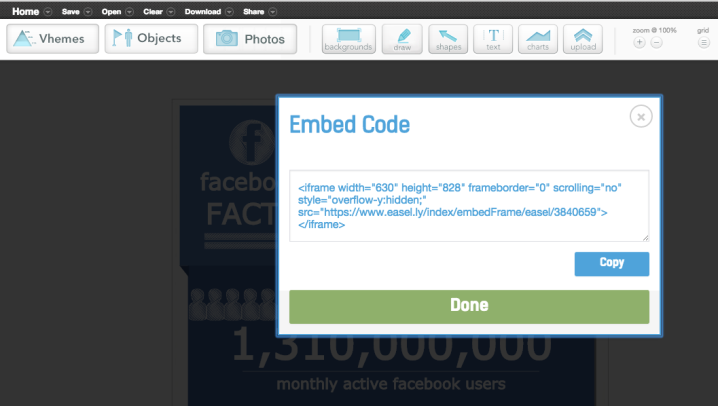
The Embed Code is the Holy Grail of blog and website traffic for infographic users. Always give your infographic an embed code, which can be found in your infographic creator tool and inserted into the HTML area of your website. This makes sure that, when your infographic gets shared, the traffic leads back to your blog page.
Also make sure to use links to your infographic and blog when you interact with others’ content, too. The backlink process works exceptionally well if you have a relationship with an influencer who has higher blog traffic than you! Reach out to them and ask them to share your infographic (with link) on their social media, website, or blog. It’s much easier for them to share an image connected to your blog than to share 1,500 words of text!
Embed Code
If you don’t have a well-established content marketing process, that list may seem slightly overwhelming. Free content? Embed codes? You may be worried that infographics will take a little more work than you want to put in, but that’s the beauty of it: they require a little effort up front and then they return to you with more readers, more conversions, and a bigger blog!
Start using infographics to expand your blog’s reach today, and see the results almost immediately. Let us know how you’re doing with your infographics, and how they’re helping you grow your blog!

10 Free Blogging Hacks That Will Save You Time

By On February 11, 2017

نتيجة بحث الصور عن لاب توب ابل

The life of a publisher is one of constant multi-tasking. One second you are brainstorming ideas for interesting content, and the other you are improving SEO and page load time. The name of the game is productivity; and the way to achieve this is through easy to use apps, plugins and sites that can help any publisher save time and money hacking his way to success.
 That’s why we here at Infolinks want to help all of our 125K partnering publishers save valuable time and become more productive and successful publishers. How you ask? by providing you with these 10 awesome free blogging hacks to help create and improve content, design, SEO, social/email and BI (business inelegance).
10 Awesome Blogging Hacks

10 Awesome Blogging Hacks and Tools:

Content:

Hubspot Blog Topic Generator:

Marketing automation giants Hubspot offer several super useful free tools for bloggers and publishers. One of the coolest and most easy to use tools is their automatic blog topic generator. With the HubSpot tool, you can enter three keywords and get five title ideas for content.

CoSchedule Headline Analyzer:

Once you know what you want your next post to be about, it’s time to choose the right headline that will make people click. CoSchedule’s free headline analyzer was built after the company analyzed more than 1 billion post headlines to build an easy to use grader that rates headlines according to word count and balance, headline type and keywords sentiment.
headline-analysis-tool-screenshot

Design:

Death to the Stock Photo

Any blogger or publisher knows how frustrating and time consuming it can be to find images to go along with your posts. With ‘Death to the Stock Photo’, every month you will receive an email with links to a new collection of free, high-res lifestyle photos. The site offers a premium subscription as well to be able to access and search its full archive.

Canva

In the past you would need expensive image editing software to make eye-catching graphics for your blog. Canva, offers a library of pre-made drag and drop templates and assets that you can manipulate while also adding your own imagery. This makes it easy for anyone to make images for your blog posts, social media graphics, presentations and Infographics.
Screen-Shot-2014-07-22-at-6.31.36-PM

SEO

Rated the #1 SEO WordPress plugin, Yoast can help you fine tune your idea and post into a specific keyword or phrase as well as give a step-by-step guide of what you need to do to improve your post’s SEO. This is done by giving you a color grade of each parameter, with your overall goal to turn all of the different categories into green.
Founded by online marketing guru Neil Patel (of KissMetrics), this easy to use tool analysis your (and any three competitors you choose) site’s SEO, social and site speed score. This in-depth tool gives you specific basic and advanced recommendations to improve your score, as well as best practices of your competitors for you to learn, and implement.
quick-sprout-web-page-speed-seo-score

Social & Email

MailChimp

MailChimp is one of the biggest and best (and free) ways to send email to your list of contacts. You can set up automated campaigns that deliver each new post that you write, or you can create campaigns from scratch. MailChimp offers free accounts for those with fewer than 2,000 contacts in their list and more than reasonable plans for advanced users.

Buffer

Once you have finished writing and publishing your blog post, Buffer helps you set up an easy sharing schedule. With Buffer you can schedule your new article to go to your social channels multiple times with different headlines or images attached to each update so you can always A/B test your copy, time of posting and image selection.
buffer-scheduler-100052932-gallery

BI (Business Inelegance)

Marketing Grader:

Another great free tool from Hubspot, the marketing grader sends you (via email) a custom report about how your website’s social media activity, mobile responsiveness, blogging activity, email marketing, lead nurturing, and analytics. Marketing Grader also outlines what particular steps you need to take in order to improve your site.

Similar Web

Maybe the most advanced free BI tool on the web, Similar Web provides traffic and marketing insights for any website. The tool provides users with a quick overview of a site’s reach, ranking and user engagement. Similar Web transforms raw data into engaging and insightful website metrics, including traffic sources, organic versus paid search, social traffic, related sites, and more.
sources_compare

*Monetization (Bonus)

Infolinks:

Now that you have saved time with these great blogging hacks, published great content and improved your site’s speed and SEO, it’s time to start making more revenue from your site! With Infolinks you can generate a new revenue stream from your site’s unused ad space with our smart intent-driven ad units that are fully compatible with all of your other standard display ad solutions.
Do you have any more blogging hacks to recommend? Read on to see if it’s included here in the list, and drop a note via Twitter and Facebook or just visit our website and join!

5 Ways to Mind Map a Memorable Blog

By On February 11, 2017
If you haven’t already come across mind mapping, it’s a tool which allows bloggers, researchers, creatives (whoever!) to represent information and thoughts in a structured, dynamic and visual way, all centered around one key title or idea.
Mind mapping has been proven to inspire creativity and increase productivity, making it a great tool to use when planning a solid structure for your blog post. And, if you embed a mind map directly into your blog post, the information displayed will become not only more visual, but also more memorable, as mind maps have been found to increase information retirement in users, and readers.
You can become a mind mapping pro by following one of MindMeister’s free tutorials, or just read on for our 5 key ways to mind map a perfectly planned, engaging and memorable blog post.
Title picture
  1. Plan it to a T
The key to a good blog post is a strong, convincing argument, but that starts with good research and even better organization.
It can take time and dedication to get from a pile of sources to one coherent argument, but that’s where mind mapping can step in to help, providing a means of collecting all of your sources and reflections in one place, and then helping to turn them into a single, structured piece.
One way of keeping your sources organized and ready to mind map is to use a Kindle.
Once you’ve gathered your sources, a Kindle will allow you to highlight quotes, sections and ideas and these can then be collated and exported to your laptop in a single text document, straight from your Kindle. At MindMeister we’ve previously written about 3 ways to access these highlights but personally I find it easiest to just connect my Kindle to my computer via USB and copy the highlights, saved as a Clippings.txt file, onto my hard drive.
Once you’ve got all your quotes, ideas, facts and figures in one place, a mind map is the ideal format to use to structure your blog post. As we blogged about in more detail, you can input them manually into a mind mapping tool, or open your My Clippings.txt file to copy and paste quotes across to form branches covering different sections, concepts and arguments.
When I mind map with MindMeister I also find it useful to make sure I’ve attached a URL to each quote, making the referencing stage of my blog super speedy. I then number each section to show how the structure should flow – especially useful when writing a checklist piece like this.
Maybe most importantly in terms of organization, get your deadlines sorted.
When you’re juggling multiple commitments at work and perhaps even multiple blog deadlines, it’s essential that you know what needs to be done and when by. Digital mind mapping tools offer the opportunity to set clear deadlines and keep your writing and projects on track. If you’d like even more control over dates and tasks, MindMeister also offers integration with MeisterTask, a project management tool to organize all of your to-dos in once place, MindMeister can be a useful mind mapping tool to achieve this, ensuring that you get everything done ahead of schedule.
Plan it to a T
  1. Ignite your creativity
Mind mapping has been proven to ignite and foster creativity, both in terms of how you use them to write, but also with how the information can be presented.
Laying out information, thoughts and concepts in a visual way, using arrows, color coordination and imagery to provide connections between key points, has been found to stimulate the brain. When you’re able to identify links between different sections, creative ideas flow more naturally and a coherent structure amongst your many thoughts begins to emerge.
The ability for mind mapping to ignite and sustain creativity has been found to help with overcoming writer’s block. Author, Johannes Epple was recommended mind mapping by a colleague after he came down with a bad case of writer’s block. Johannes explains that since using the brainstorming tool, he is yet to face writer’s block again and was able to come up with some of his best ideas and characters while using it.
Johannes’ story chimes with the stats. A 2004 study found that mind mapping enhances writing productivity by 23%, as you’re able to transcribe your ideas with very little effort and a great deal of speed, and when using a simple digital mind mapping tool this mind map can swiftly be converted into a single word document.
So how does that work? As Lateral Action breaks down for us, the benefit of mind mapping stems from the opportunity to utilize both the left and right hand sides of the brain:
“Many people associate the right brain with creativity and lateral thinking, and there’s certainly something to that. Our left brains create structures that can act as barriers to alternative solutions and perspectives.
But your left brain plays a crucial role in creativity as well. Seeing logical associations between seemingly unrelated things is a hallmark of creativity. And the critical-thinking skills necessary to tell a good idea from a bad one are pretty important too.”
So by creating a visual and interconnected structure, we are able to utilize both our creative and structured sides of the brains to spark creativity and productivity, by realizing connections, while ensuring a strong structure is achieved.
10 out of 12 people in the previously mentioned 2004 study found that mind mapping improved their writing and the ability to use online mind mapping tools quickly and simply make brainstorming tools ideal for not only authors, but also writers of shorter pieces too, such as your next blog…
Spark your creativity image
  1. Collaborate with others
I find one of the best ways of coming up with new ideas, and cutting out the nonsensical ones, is by bouncing ideas between other writers, colleagues and friends.
In her book “Creative Collaboration” Dr. Vera John-Steiner concluded that “social interactions are crucial” as they provide a “non-judgmental ear for emerging ideas”, but when working predominantly online, often remotely and even across continents, meeting up to go over a few ideas, a draft or a handwritten mind map can prove tricky, and this creative collaboration can be stunted – that’s where digital mind mapping steps in.
With digital mind mapping, once you’ve come up with your mind map you can share it easily with other collaborators, either just to view it, to embed it or to allow your friend access to edit the map themselves. In a similar way to how Google Docs works, just send a link to your mind map or invite your colleague to become a collaborator and get communicating.
Collaborate with others image
  1. Add some visuals
As mentioned in the Infolinks’ blog on ‘The Anatomy of a Perfect Blog Post’, the ideal blog post should include good imagery. For example, a feature image included at the beginning your blog, just below the title, is central to making the blog shareable, as it then appears as the icon.
To ensure your blog is visual and attractive, try attaching images to your mind map as you plan. As shown below, you can add images and videos to your mind map throughout the brainstorming process, so you really have each section planned out precisely and ready to upload.
By having the images and videos visually available in the planning stage, your mind map appears engaging to you as the writer too, helping you stay focused on the task in hand and nail the blog, ahead of your deadline.
Add some visuals image
  1. Make it memorable
Toni Kasnic gave a great talk on ‘learning how best to learn’ at Biggerplate Unplugged 2016 which, in a nutshell, demonstrated that the means of learning is as important as the content taught, when aiming to improve information retention.
Although Toni was referring to the use of mind maps in education, this principle can be applied to blogging too – we spend a great deal of time mulling over the content of our blogs and while high-quality text is a key aspect, it’s essential that we also think about how best to format this information, to make sure our arguments are not only coherent and convincing, but also understandable and memorable.
Studies have found that displaying information in a visual way, such as a mind map featuring images, colors, shapes and connections, can improve memory by 10-15%, with some studies claiming it can improve information retention by up to a whopping 32%.
Embedded mind maps can help to break up blocks of text in a similar way to the use of bullet points or headers, so to help your readers digest your ideas, try embedding a mind map, directly into your blog. You could either embed the mind map you used to plan the blog, or a less detailed version which spells out your key 5 or so points on separate branches.
By using mind maps embedded within your blog, the reader will be more likely to remember it, increasing the chances of them returning to your blog in the future, while also making the piece look nicer and increasing its shareability.
So hopefully you’re now on board with how mind mapping can help you to let those creative ideas flow and establish a coherent structured blog more efficiently.
For some mind mapping inspiration, check out these awe-inspiring mind maps in the MindMeister public library and for a tutorial on how to set up your own why not check out one of the free MindMeister training courses. Alternatively simply comment below with questions on how to make the most of online mind mapping tools.
Make it memorable

Top 10 Free Blogging Tools You Don’t Know

By On February 11, 2017
Every profession or hobby requires a set of tools. Painters need a brush, paint, and canvas. DIY passionate need tools like a saw or a hammer. Enthusiasts of jogging need decent running shoes and similar equipment. Blogging is no different – you need a tool set that will help you make the most out of your blog and minimize your effort.
the-top-10-free-blogging-tools-you-dont-know
But it can be costly – sometimes even a few hundred dollars a month. So what to do about it? A good idea is to look for tools that offer free packages – you can test them at no cost and upgrade only when you see enough value.
In this article, I’ll present to you the 10 best free blogging tools. I’m not going to write about popular tools such as Trello, MailChimp, or Google Analytics. They are excellent but I bet you know them very well already. In this article, I’ll give you a list of the top 10 free blogging tools you probably don’t know yet.
  1. Screaming Frog – make your blog SEO-friendly
    Write and people will come? Not anymore. We live in an era of information overload. Everyone’s competing for the attention of a potential audience. If you own a small blog, writing a new post won’t attract hundreds of visitors by itself. You must make it easy to find. And where do people look for information? Yup, Google or similar search engines. 
    Screaming Frog will help you make sure that your website looks good for site crawlers. This tool shows what you should fix to improve search rankings, like filling out missing alt descriptions of images, using the right kind of redirects, or complete missing meta descriptions. 
    Pro tip: page load time is considered to be one of the most important factors affecting SEO (more on this topic here). Use Page Speed Tools and Pingdom to discover how you can make your website load faster.
  1. Infolinks – make money from your blog 
    Why do you run a blog at all? Probably you follow your passion and want to share it with others while also educating them. That’s great. But having a blog is not free. Hosting is not free, templates are not free, you’re likely to upgrade to a few paid tools or plugins. Plus, your time and effort put into developing the blog are valuable. So it would be nice to earn something, right? 
    That’s what monetization platforms are for. Put banners or promoted links on your blog and get paid when people click them. Infolinks is one of such platforms, used by over 200k websites worldwide. 
    Pro tip: people are getting immune to traditional banners so choose a monetization platform that offers more types of promoted content, like Infolinks’ innovative ads.
make-money-from-your-site
  1. Survicate – collect feedback & email signups
    Do readers like your content? Who knows. You can get some hints from comments or the number of social shares. But these are only hints. You can directly ask your readers how they like what they read. How to do it?
    Use a tool like Survicate. You’ll be able to launch targeted survey widgets and collect feedback from visitors. Ask them not only how they like what they are reading, but also what they want you to write about next, what are their interests or what forms of content they like the most. Collected answers will help you create better content than ever.
    Pro tip: you can also use Survicate or any similar tool to collect signups for your mailing lists. Exit surveys will be the most useful here.
  1. Notify – promote your content directly on social media
    As we already agreed, people look for information using search engines. But now they also use a more proactive way – social media. They ask for recommendations (like ‘Can anyone recommend me good running shoes for a beginner?’) and for information as well (like ‘How do I increase social media traffic to my website?’). 
    Finding such conversations is a great opportunity for you to promote your content. Use Notify to be notified on Slack or HipChat about tweets that contain keywords you choose. Jump into conversations and suggest your relevant content.
    Pro tip: add names of your competitors to monitored keywords to find out what people are saying about their content.
  1. ManageFlitter – grow your Twitter follower base
    One of the ways to get your content in front of new people is to build a follower base on social media channels. Sounds good but how to do it?
    There’s one simple trick – follow people that can be interested in your profile and content that you share. Use a tool like ManageFlitter or Crowdfire to do it. This technique helped us grow the number of followers from 0 to 17000 with little effort.
    Pro tip: remember about unfollowing people who don’t follow you back; otherwise you will quickly ruin stats of your account and even can be marked as “spammy”.
engage-your-audience
  1. Appear.in – engage your audience with webinars
    How can you engage your audience more than with text? Yup, you’re right – use interactive forms of content. You won’t find a more interactive than webinars. They will help you build your position as an expert in your niche and you will get more personal contact with your audience. Downsides?
    You need to prepare well. There is nothing worse than a webinar full of silence or mumbling. And choose software wisely. For some reason, the right webinar software is still not easy to find. But appear.in works smoothly and allows you to have up to 8 participants at no cost. You can check how this form of interaction resonates with a small selected part of your audience before you go full-scale, which will require a premium plan.
    Pro tip: invite the most active members of your audience to the first webinar and collect their feedback to polish the script and gain confidence.
  1. Buzzsumo – find hot topics
    Tapping into trending topic is a good way to increase readership – people like reading about hot stuff. That’s why after each Apple conference you see dozens of similar articles about released products. It’s especially easy to do with regular events like Christmas or SuperBowl. But there are many topics that appear from nowhere and gain traction in a matter of days or sometimes hours. How to spot them to be able to join the fever?
    You must follow trends. Google Trends will help you with that. You’ll see what’s trending right now.
    Pro tip: after spotting hot topics, use Buzzsumo to find what has already been published. Next, use skyscraper technique to create better and more in-depth content than already existing.
find-hot-topics
  1. Hemingway App – polish your writing 
    What I’m about to tell shouldn’t surprise you – blogging requires solid writing skills. Your articles should be pleasant to read while also informative and engaging. Everyone has a different writing style but we can’t forget about ease of reading. Keeping sentences simple didn’t hurt anybody. In fact, this one of the factors that made the style of Ernest Hemingway so different and led to a Nobel Prize in 1954. 
    Unfortunately, Hemingway can’t check your writing – he is dead. But an app called Hemingway can. It will show you where you are elaborating too much, what you can cut and which words are worth replacing for simpler synonyms. For me, it’s a must-have (this text was edited with Hemingway as I tend to elaborate too much).
    Pro tip: if you’re not a native English speaker, use Grammarly to check and improve your writing before you upload an article to Hemingway.
  1. Startup Stock Photos and Pexels – get images 
    What draws the attention of readers? Pictures. If you produce 2000 words long text and add no images, few people will read it to the end. It’s easy to fix – just add a few images that match the context. You don’t have to take a camera by yourself and shoot pictures – stock photos will work well most of the times. So go to a website like Startup Stock Photos or Pexels and grab some pictures for your blog. Just don’t forget about attribution, if it is required.
    Pro tip: if you need to edit photos of any other graphics, take a look at Canva – a simple but powerful browser-based graphic edition tool.
  1. Keywordtool.io and Keyword Planner – research interesting keywords
    How to create content that ranks well in Google? Technical details like those described in point 2 are important, no doubt about it. But what’s even more important is writing about the right keywords. How to find them?
    First, use keywordtool.io or a similar tool. Enter the topic you want to write about. You’ll get a list of related keywords. Copy it and upload to AdWords Keyword Planner. You will see how many people search for those terms and how competitive they are (the higher competition, the harder it’s to rank high in Google for a term). Choose keywords that your audience will find interesting with as low competition as possible, write, and see how articles rank.
    Pro tip: while keywords are important, keyword stuffing doesn’t work anymore. Focus on quality instead.
As you can see, you don’t have to drain your budget to get equipped with the tools to gather feedback on your articles, polish writing, choose interesting topics, and even earn on your writing. So choose tools that you think will be the most useful and put them to the test.
PS. don’t forget to take a look at Infolinks’ special deals to access discount for a bunch tools useful for bloggers!

Popular

Categories